Usability evaluation

Heuristic evaluation

#2: Match between system and the real world

The choice of language in the user app is simple and easy to understand. The application does not use system specific language and instead uses a casual way of conveying the information. The home screen is simple and only conveys the most important information that is relevant for the user. The home screen also shows if there are any new requests for the user to look over, giving it a natural feel in the information you receive. The subsequent screens are in a logical order with giving it an overall natural information order.

The wording in the assistant app is more direct and concise then the user version. The application keeps a casual language despite the higher level of language and avoids the complex system-oriented terms. The home screen gives the assistant an easy way of quickly navigating to different screens with a logical order of information.

The “Match between system and the real world” rating is a 0 for its ease of use and uncluttered design.

#4: Consistency and standards

The applications use the same exterior design for navigation and hearing aid. The applications also share internal designs with coloring, shapes and layout. The only deviation between the applications is the easier language being used in the user application.

The “Consistency and standards” rating is a 1 because of the difference in level of language and home screen design. These are however not real issues because of the need for a differentiating design depending on the user group. The fix for this would a consistent language between the applications while keeping the ease of use for all user groups.

#6: Recognition rather than recall

The applications are similar in how they only keep the relevant information on the screen for the users need. The apps are design to only need the information on the page you are on in some rare cases direct you to a new page for information about specific details.

The “Recognition rather then recall” rating is a 0 since there are no instances in the applications that require you to recall something for a previous screen.

#7: Flexibility and efficiency of use

The layout of the applications is well thought out and was easy to navigate and was efficient in scheduling and communication.

The “Flexibility and efficiency of use” rating is a 0 since there was no issues in the flexibility.

#8: Aesthetic and minimalist design

The focus of the applications has always been their minimalistic designs and focus on ease of use. This means that the dialogs only contain the information that is relevant for the screen. There are also bigger buttons with a clear contrast to the background for an ease of understanding what you can click and what you cannot. The font used in the applications are on the other hand a bit harder to read.

The “Aesthetic and minimalist design” rating is a 1 since the design is overall very good and doesn’t focus on color coordination but has a font that can be hard to read. The fix for this is to change to a font with serifs for an easier reading experience.

Think aloud protocol

Two members of our group tried the app with their partners at home and asked them to navigate through the app prototype in Adobe XD. The members explained what the purpose of the app was, how it was supposed to be used and gave the subjects a few tasks: booking an event through the user interface, booking an event through the assistant interface, finding contact information about a relative, through the assistant interface. Moreover they were asked to generally navigate through the app, whilst thinking aloud and providing us with some thought and spontanious comments and reflections.

The booking of an event- USER

The subject was given the task to book an event as a user at an LSS facility would do. The subject found it difficult to locate the event booking information on the home screen, which gives info about the very next event that is going to take place and how much time is remaining. By finding the icon for calendar the subject was able to find the ”ADD NEW EVENT” button, but commenting on the appearence of the small icon, being hard to find and figure out that the new event booking takes place in the calendar. Some frustration was recorded trying to navigate through the app and booking an event. Some back buttons and home buttons didn’t work and caused frustration and irritation.

The booking of an event and finding a relative- ASSISTANT

The subjects respectively were given the tasks of finding a relative and booking an event. One subject tried to find the relative by clicking on ”Users” and accesing the user list. Clicking on a user name took the subject to the more info page about the user. Information about relative’s name was present but not clickable and therefore no possibility of contacting the relative or finding out the contact info. The contact possibility is only available through an existing, scheduled event for the user. The subject with task of booking an event through the assistant interface tried to do it by clicking on ”User events” and found only a list of booked events for the users that the assistant is responsible for. Finally, the subject remembered that through the icon for calendar, some kind of calendar should appear, and it did, with a big ”ADD NEW EVENT” button.

Reflections of the subjects

Some of the reflections generally about the app after navigating through it were that the user interface might be a bit hard to understand. Finding the event scheduling was frustrating but in itself the app in its’ function is limited, with big buttons and straight to the point. The suggestion is to completely remove the calendar function and only have events displayed that are occuring in the near future, as with the home screen. The app also seems to make the communication between user and assistant easier and perhaps should be marketed as a means of communication between those two parties. The subject suggested that the only ones who can determine if the functions of the app are useful and easy to use are the users themselves, perhaps in accordance with their assistants.
Interactive prototype

The Design process started by us asking ourselves, why would our target group use our application.
We wanted our application to simplify communications and scheduling and the value added in the user’s life should be the experience and fulfillment of their need. Our approach was to focus on this and make it as simple as we could no matter savviness or functionality. We want our users to experience the application as Fun, simple and motivating so they use it more.
We translated these abstract notions to more tangible point of usability.
Effectiveness– Does the application do what it should in terms of communications, scheduling and coordinating the various participants lives?
Efficiency – is it simple? Is it straight forward? Is the possibility for errors limited and is there minimal memory overload?
Satisfaction – at that it is simple enough that it fit into the user’s everyday life seamlessly.

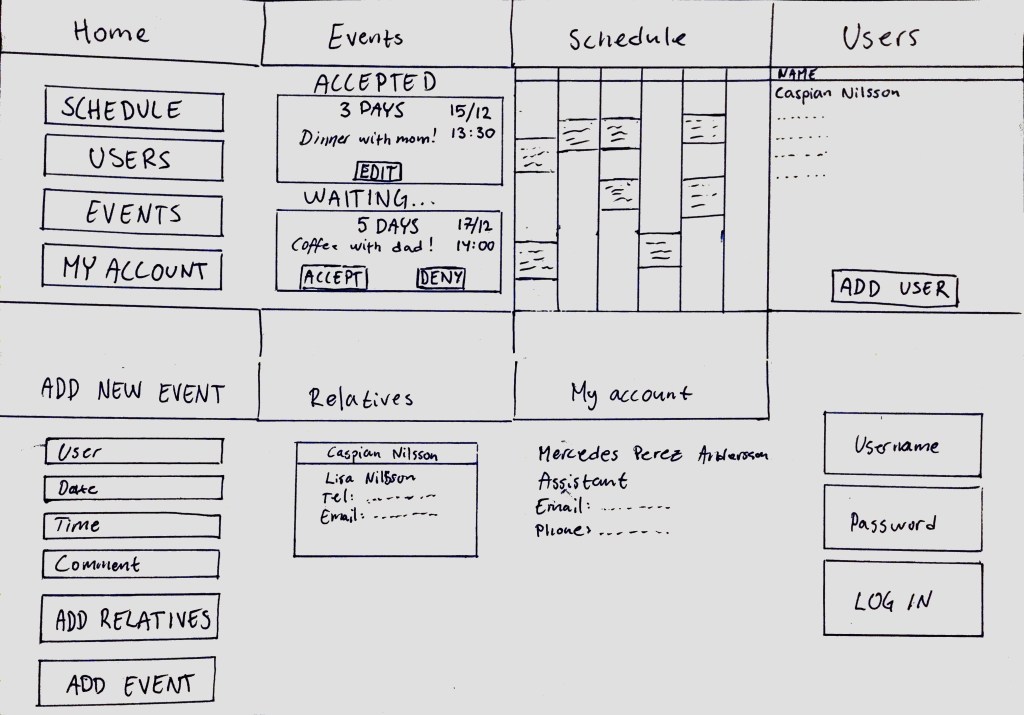
To fulfill the above criteria we utilized Don Norman design principles and we also kept Jacob Nielsens Heuristic principles in mind. The application as you can see in our prototype mockups have a primary focus on the following points:

Visibility in the application – The user will always know where they are in the process with clear headers. When a button is pushed it will give a visual cue indicating that it has been pushed and thus the system is communicating with the user letting them know that the process has started.
User control – To reaffirm the users control there is always a “return” button when needed (as in any subpages). The footer menu has a home button, so the user always has two “emergency exits” (“return” and “Home”).
Consistency – All icons used (ex. “return”, “chat” etc.) are according to market standard to give a sense of familiarity. We try to strictly adhere to external consistencies to not break any established conventions so the application will be usable for anybody with any potential restrictions. The language used throughout the application is familiar and basic so that it is understood by the majority of the userbase. By using internal consistency, we try to promote Recognition rather than Recall minimizing the user’s memory load. 
Flexibility – There are accelerators throughout the application in the shape of the footer bar which gives the user quick access to certain functions.
Aesthetic – a minimalist design is used both for the aesthetic appeal and by only trying to communicate relevant information. No “Noise”.

While we feel that the application fulfills the purpose we had in mind, there are actual debate whether it is better than a physical calendar. What one needs to keep in mind though is that the application is not a digital calendar, it is a multifaceted tool for clearer paths of communication between the various parties.
A future enhancement of the application is that when it is going to be in use it will be customizable to each main Users capabilities and needs, and their individual action plan that has been agreed upon by their Relative and Assistant.

Our design choices

Reflections and design choices in wireframing and mockup

In this segment we will aim to walk you through the design process of our wireframe and mockup, and the rationale behind the decisions. 
There were a lot of groundwork put down during the steps before we came to this stage (i.e. the storyboards and personas), there was a clear picture as to the functionalities of the product. In short, the main purpose of the product would have to be the scheduling and communication between the User and the intended parties. Therefor the actual event that was closest is prioritized. This took the shape in the way that for the User and the relative it would be the first thing seen. The assistants screen is where it diverges, considering the assistant might need a more eagle-eyed view of activities. The reasoning behind this was that the assistant might very well have more than one subject, therefore it would be more helpful to have a more traditional scheduling view over all the events. 

It was in fact at this stage where we started asking ourselves more in- depth questions regarding the division of the functionalities. As previously mentioned, the core tenants of this application is the increased autonomy of the User. The User needs to be involved in the decision process, to increase the clarity and efficiency in the communication between User, Assistant and Relative. Here we started to identify what the essential functions would have to be for each intended subject. Naturally the discussion started at the Users end.
The User would have to be able to see their scheduled events. Also, they should have the ability to create new events if they so choose. The nature of these events, after much discussion, were identified as events that could involve other people connected through the app if they so choose (in which case a notification would be sent to the relevant parties) and events that don’t.
The User would also need to be able to see an overview of events to come, so that some sort of schedule would need to exist as well. Since the application is supposed to simplify theses matters there was concern that an overload of information would be detrimental to the intended purpose of the app. For this reason, the application on the Users side only displays a weekly schedule instead of a monthly, but would be prioritized as a secondary page because with the simplicity in mind and the avoidance of over-information, the decision to prioritize the closest event as the first screen was reaffirmed. Wanting the User to always have the final say in their involvement in events, the User would need to have the ability to accept or reject events made by the subject Relative.
These would appear as notification on the application, and if accepted, would be added to both schedules. If rejected, it would simply disappear. Same would apply if the User sent a request of an event to the Relative subject. Upon the acceptance of an event it would be added to the schedule of all parties. 

When discussing the relevant functionalities of the Relative subject, two things came to mind, the ability to see events they themselves were involved in and seeing in-coming events sent by the User. The right to privacy of the User would make the schedule of the User be inaccessible to the Relative subject other than the ability to see if the User is free at the time the Relative tries to create an event. This functionality was added with the purpose of minimizing notifications of event requests that could otherwise simply be avoided. 

Of course, this left us with a few crucial functionalities of the app that were left over, such as account creation, adding and linking of User-Relative-Assistant. If one would consider the Assistant subject as a type of hub in regards to the application and the fact that there might be reasons that they be in the loop of any events involving their subjects, it would not be unreasonable to add these key functionalities in their version of the application. In day-to-day operations of the Assistant, the priority would have to be the ability to have an overview of what is going on. There for the first screen would be a schedule with the Assistants affiliated Users activities. Thinking there might be a need to plan ahead on a grander scale, the decision was made that the Assistants schedule would display the full workweek with small notations in each day for every event. The Assistant subject can add events of their own in that interface as well. Next priority would be to see a list of affiliated Users and their contact information. Upon accessing a User in this menu, the affiliated Relatives of the User and their contact info would be made available.  Seeing as the Assistant subject would have the most information in their interface, we simply reasoned that when a new User would come into the purview of the Assistant, they would through the user-slide of their interface add a new User subject. Within that User subject they would then add any Relatives that the User might want to link. Upon finishing the creation of the User, there would then be a confirmation of sorts sent to the User/Relative that was created so they may add any additional information and potentially add any passwords, thus passing the control of the created subject back to the intended users. 

After mapping out the functionalities, the distribution of them between the subjects and prioritized them within each interface, we were faced with the challenge of design.
Having identified the need to keep it simple and minimize the amount of information, we decided to try to be as concise as possible with the text. Using a direct and simple vocabulary it would help keep it minimal and yet retain maximum usability by not alienating people with minimal tech-savviness and/or ability. Clarity became a priority, so the buttons were made large and distinct.
As we were prioritizing simplicity and minimalism, we decided to draw inspiration from something familiar to all of us here at Watermelon, Scandinavian design (as we, Watermelon are students in Sweden). A very simplified interpretation of the core concepts in Scandinavian design are functionality and minimalism. This felt very much in line with our vision for how we wanted the application to look. Starting with our chosen color pallet, it is very simple, black text on a white background with a header in a toned-down pastels. This was a choice that lined up well for us as we had wanted the design to not be color coordinated in anyway as to decrease usability for potentially colorblind Users. The more we tried applying the principles of Scandinavian design we saw more and more overlap between what our needs were and the aesthetics of our design choices. Scandinavian design tends to aim for a decluttered space, we wanted the application to be as straightforward and avoid displaying to much information. The use of clear, simple lines and subtle accents can be seen throughout the application. Keeping in mind this school of thought as we worked on our mockup, we happily noted a sense of cohesion in the overall aesthetics of the application without many (if any) concession in functionality or vision.

 “Less is more”, a not too uncommon turn of phrase in Scandinavian design, rings true in many ways for what Watermelon security tries to achieve with this application. It is after all our hope that this application will help and enrich the lives of its users through minimal effort and complications. 

Storyboard

The Story behind our Storyboard

Our personas were central in the way we developed our scenario’s and subsequent storyboards. We chose to make them, in short, as three very involved users with their own sets of needs and challenges. The differently able yet highly active young man, the fast-moving and very involved mother, and the caring, perpetually busy yet ditzy assistant.

The reasoning behind this was two-fold that came to dictate a lot of our approach and development of the storyboards:

One, if our product could fit in and help fulfill these complicated people who possibly have more demanding needs than average, it could very well come to help resolve the issues of other people as well.

Secondly, it became more and more clear to us as we were working that it was very important to underline the human aspect. The personas had to be developed, with their own emotions, responses and needs. We wished to avoid falling in the trap where we treated the potential users for our product as just variables. The end purpose of the application is to better the lives of its users, so to that end we had to give life to the personas. 

As we were developing our scenarios (from which we also made accompanying storyboards) we started off with our user-stories that essentially boiled down to three different complications that we set out to resolve with our application. The increased independence and potential for more autonomy in the patient’s life. Facilitating a more effective line of communication and subsequent improvement in the mothers (and relatives) involvement in the patient’s life. Increased structure and improvement in the day to day chores and work of the assistant.
More so than these more individual needs, the application of our product could hopefully improve the relations between these users by lessening unnecessary friction, and by doing so removing some of the strain that could appear in theses relationships.

We mocked up a scenario were a complication would occur, where we could depict the needs of our personas. Keeping in mind our whish of showing our users as actual individuals, we tried to show their responses in accordance to the rich tapestry we had created as we were mapping out their personas. When the first scenario was finished, we essentially rewrote the premise of it, but from another user’s perspective (in this case the assistants).

Both our scenarios and accompanying storyboards are linked to the same conflict. The reasoning behind this was that our three users may have different needs, but they all engage in a three-way relationship, and each conflict affects them all but differently and with-it different consequences. Our solution is aimed at avoiding having these events occurring in the first place.  

Some of the conclusions drawn and insights gained from us working on these storyboards where some different functions we would potentially need and how big a part “user-friendliness” will play in the further development of our product. The impact an application such as this could have on the lives of the potential users also started to sink in. Somewhere in this process we, the participants in this project, became more than just students. We became Watermelon Security. 

Scenario 1

Caspians story

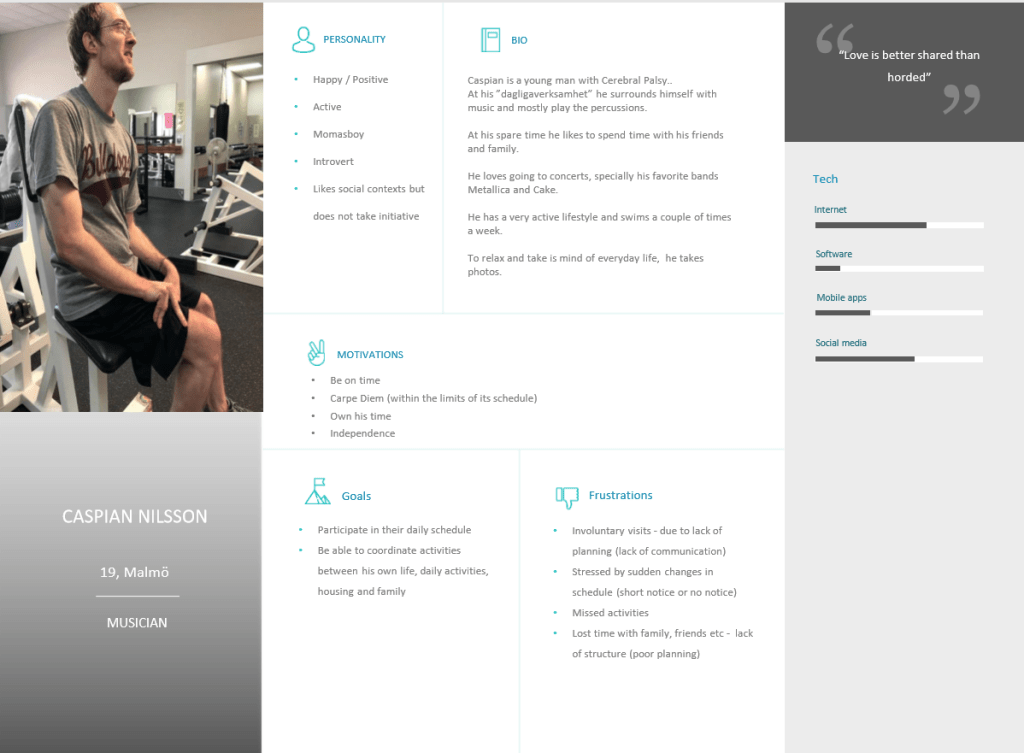
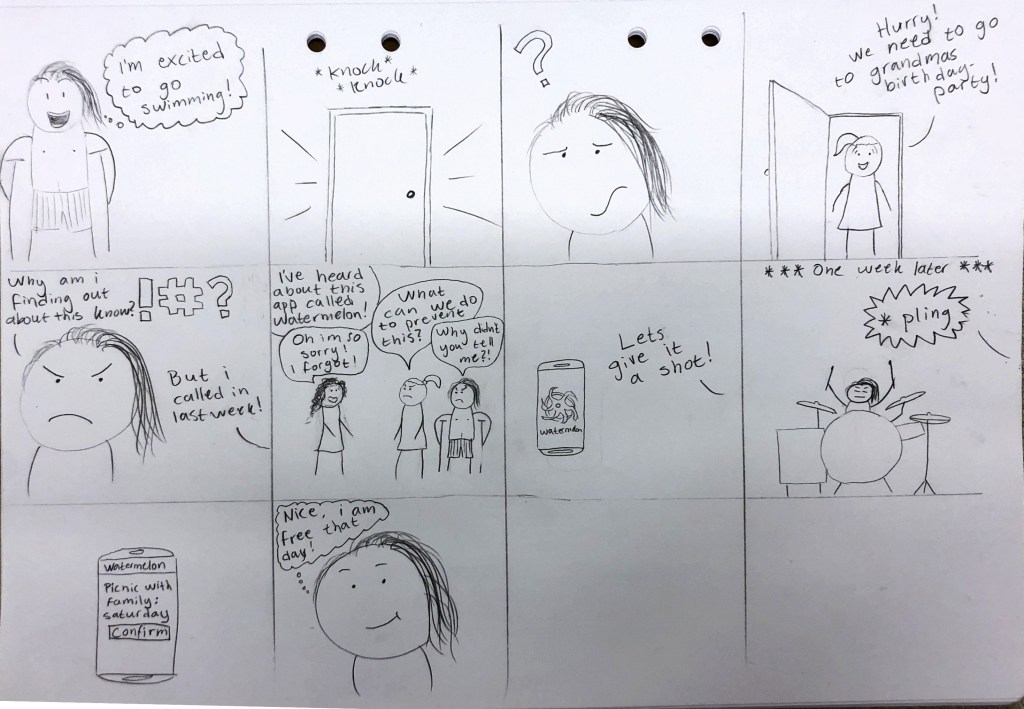
Caspian is enjoying a nice day at his assistant living facility. He is getting ready to go to is swim class.

But oh no! There is a knock at the door! But who could it be? He didn’t know about any visitor today?

Caspian opens the door and is surprised at seeing his mother standing there. She says that they need to hurry because they need to get over to his grandmothers 70-th birthday dinner.

Caspian feels both a little ashamed and very frustrated. He really wanted to go swimming today and he haven’t had a chance to by anything for his grandmother as this is the first thing he’s heard about a 70-th birthday dinner.

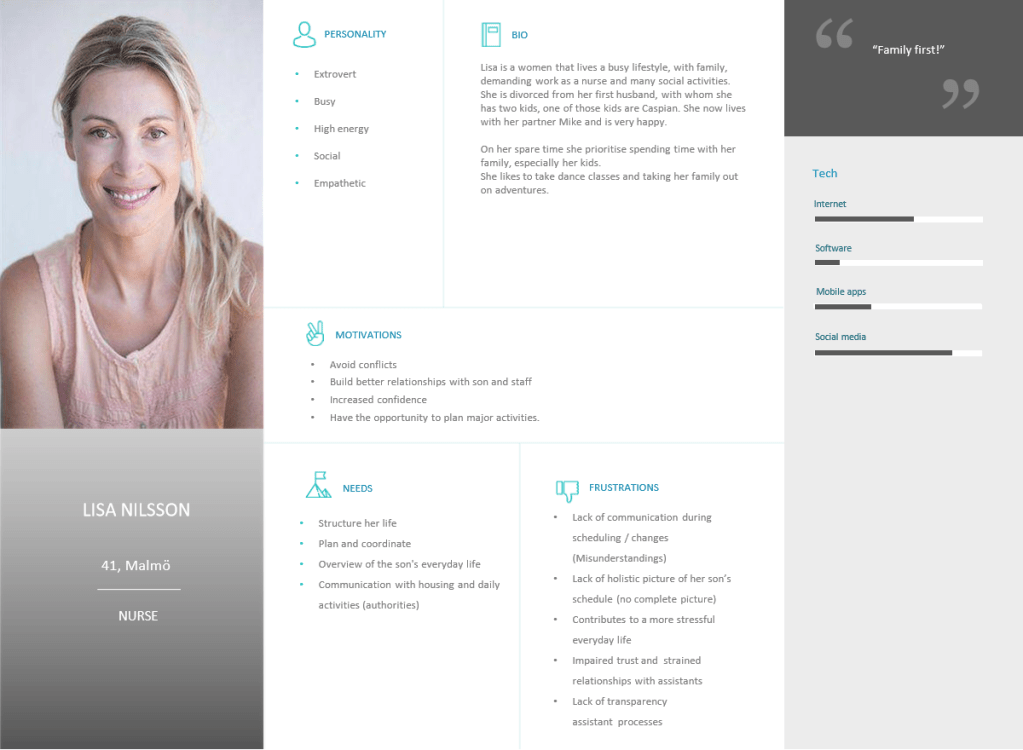
He asks his mother Lisa why she didn’t give him more notice, but she says in a surprised voice that she called his assistant last week!
Clearly there is an issue with communication here, so Caspian starts looking for a better solution to his scheduling needs.

So Caspian and his mother Lisa approaches the assistant Mercedes about this scheduling conflict and how best to avoid future mishaps.
Mercedes is horrified and apologizes profusely for the snafu. She had completely forgotten about it as the call came during her medical round but then it slipped her mind, again.

Mercedes says she has heard about this app called  “Watermelon”™ that is supposed to be very help full! They can all add activities to the schedule and have access to the changes and full daily plans in real time.
Caspian and his mother Lisa agrees to try it out so they all download the app.

****One week Later****
Caspian is at band practice and he gets a notification on his phone. His mother Lisa added a family picknick for the coming Saturday which is great because he has no plans for that day. His mother obviously knew that as she could se his schedule. 

CASPIANS STORY

Scenario 2

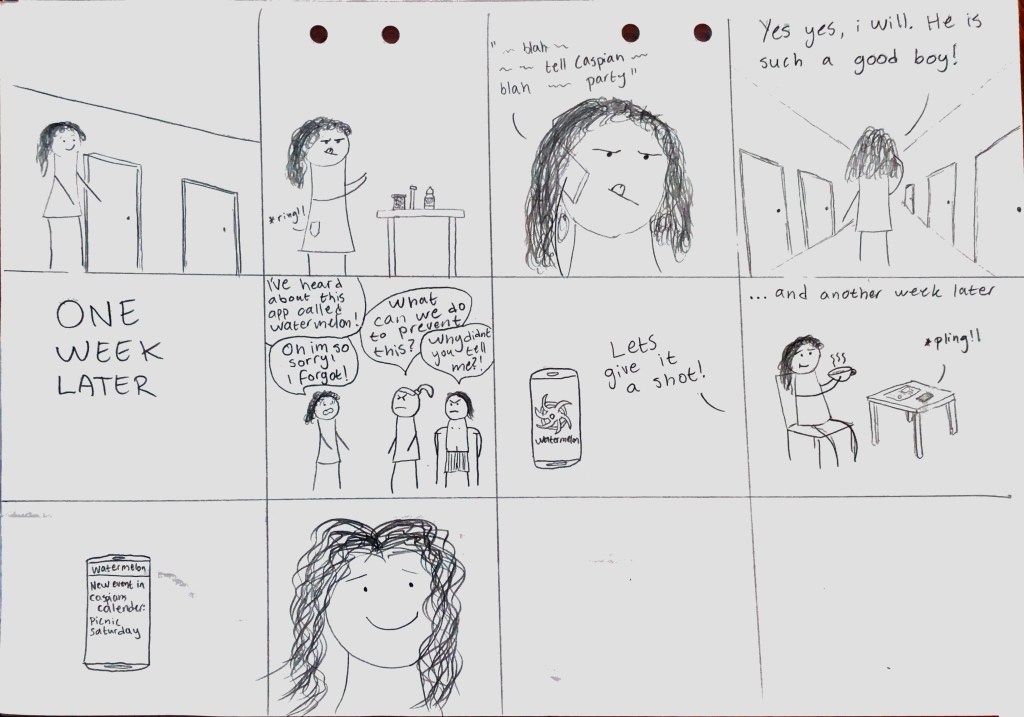
Mercedes story

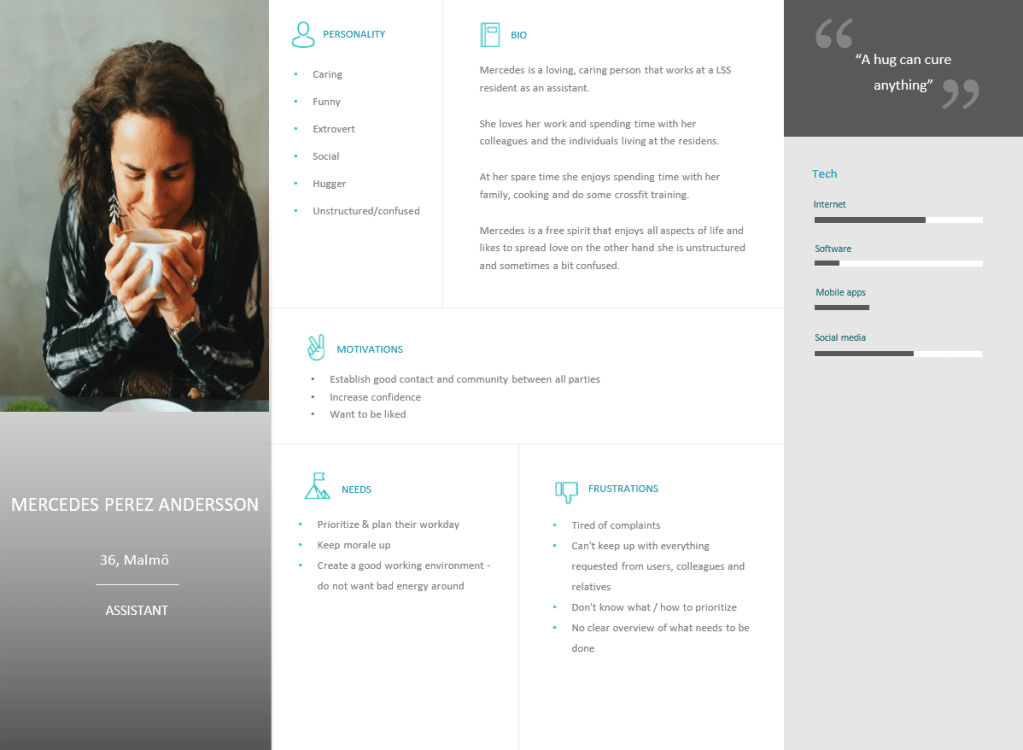
Mercedes is doing her rounds at the facility, making sure all the patients get their medication on time and spreads as much cheer she can muster where-ever she goes.

She is dosing out some medication for a patient while she is trying to cheer her patient up, suddenly her phone rings! She answers the phone while juggling the medication, it is Lisa, her dear Caspians mother. Lisa asks Mercedes to notify Caspian that they are going to his grandmother next week for her 70-th birthday party. Distractedly Mercedes let’s Lisa know that she will let him know and that he is such a nice boy.

Mercedes carries on with her round, talking to everyone with good cheer and completely forgetting to tell Caspian about the birthday party.

****One Week Later****
As Mercedes is working she is approached by Caspian and his mother Lisa. Mercedes lights up and jauntily approaches the mother-son pair with a big smile. But oh no! They look so concerned!

They tell Mercedes about the little scheduling snafu and she can tell that they are upset. Mercedes is horrified as she realizes she forgot to tell Caspian about the party and feels very guilty to have caused her charge and his mother any heartache. She apologizes while her mind is working a mile a minute for any potential solution.
She remembers reading about this new scheduling app called melon-something? Watermelon! She mentions the app to them and they all agree to try out the app.

****One Week Later****
Mercedes is having a rare moment of quiet, well as quiet as she can be listening to her lifestyle podcast, having a cup of matcha tea (sweetened with all natural stevia). Her phone get’s a notification. Mercedes pauses the podcast and looks at her phone, it is a notification from the Watermelon app. Seems like Caspian is going on a picknick with his family next Saturday, oh how nice. 

MERCEDES STORY

User stories

We have created three user stories, one for each personas.

The user stories help us to understand what needs are present for the different personas that we have created. Currently the user groups are not coordinated in the scheduling or planning of the everyday life of the ”user”. The user stories help us consider the different aspects of the product, i.e. as mentioned in the interviews: the product has to consider the assitants’ obligation to observe silence in relation to the ”user”.

Based on the needs that are presented in the user stories we can create a product that meets the demands that are mapped out.The primary goal of the product will be the wellbeing of all the personas combined. Therefore, it is important to not only have a shared platform for scheduling, communication and coordination.
Equally important is to have a product with good usability and accessibility to people from all walks of Life.

User Story 1 – The user

As a person with a certain functional impairment, I want to reclaim my independence and not have to be worried about the logistics of all other parts in my life, so that I can enjoy life and have fun with everyone I love.

User Story 2 – The assistant

As an assistant to a person with a certain functional impairment, I want to have a better overview of my everyday work together with the “user” (relatives) and my colleagues, so that I can prioritise my day in a better way, creating a better workflow and spend time on building trustful relationships.

User Story 3 – The relative

As a relative to a person with a certain functional impairment, I want to have the ability to plan our interactions in a structured way, so that it fits in their/and my own schedule, to avoid double bookings and misunderstandings with the assistants. And instead spend time to nurture the relationship with the “user”.

Personas

The user (person with certain functional impairments)

Why the user (person with certain functional impairments) persona?

Based on our product idea to create a solution that can unify scheduling, communication and other needs in connection to the coordination of a person with a certain functional impairments life – we have identified three main user groups. 

One of the main user groups  is the user, that is the person with a certain functional impairments. This user group is the main user group where all other user groups are sub-groups under. 

The user can be someone that lives at a LSS accommodation, someone that works at a “dagligverksamhet” or has a need to coordinate their activities in connection to their life. 

The user is entitled to a life of independence where they have a right according to law to study, work and have a meaningful life. They are also entitled to a social lifestyle and should be able to be part of a cultural and social life.
To support them with this the user is dependent on both sub user groups, the assistant and the relatives.
As mentioned in the assistant persona, they are responsible to create an implementation plan and realise it. 

Based on the above, the user, is a given user group of our product. 

How did we come up with the user persona?

To establish the persona for the user we started with data collection:
Since we in the group have a personal relationship and experience we are basing the persona of the user from our own experience and knowledge. 

The assistant

Why the assistant persona?

Based on our product idea to create a solution that can unify scheduling, communication and other needs in connection to the coordination of a person with certain functional impairments life – we have identified three main user groups. 

One of the user groups  is the assistant that has a central role in the Life of a person with certain functional impairment. They are the spider in the web – communicating with both the person with a certain functional impairment and their relatives

You can see the assistant, as the coordination central, the hub, for all planning, scheduling and communication. They are the ones that are responsible of making the life easier and making sure that these individuals have the same human rights as a “normal” person.
The assistants also have the obligation to observe silence, in relation to the person with functional impairment.
To make sure that this happens the assistants plans and creates an individual implementation plan, based on the specific needs of the person with a certain functional impairment.

Based on the above, the assistant, is a given user group of our product. 

How did we come up with the assistant persona?

To establish the persona for the assistant we started with data collection:
Browsing the web:
Profiles used to recruit personnel working at a LSS accommodation

Interviews: 
Interviewing two assistants that are working at an LSS accommodation.

Interview questions & answers:

Describe yourself in relation to your profession?

We both like to work with people and have conducted this line of work our entire carrier.

Briefly describe a day at work.

We work according to planned “efforts” that are based on our implementation plan for each individual.
These implementation plans are based on the specific needs that each individual have at the LSS accommodation. 

What systems/applications are you using today for communication / scheduling?

Today we use the phone or e-mail  to communicate verbally or via text message,  with both the residents and relatives. 

Do you think that communication can be improved with relatives / users?

The communication with the residents at the LSS accomodation is working good, the communication with relatives needs to improve. 

How do you think the communication can be improved?

That there is a way to communicate easily from both ends. 

Describe how you typically do when booking activities?

If we have events planned we give the individuals at the LSS accomodation an invitation with pictures legible text. 

Describe how you do schedule changes? How do you notify a relative / user of any changes?

We do the changes with the individuals at the LSS accommodation and anchor it with relatives when needed (via e-mail or phone). 

Do you know of any other digital tools that is out on the market but not used?

No

What do you think about the idea for our product?

It is a good idea, but you need to think about the silence duty that we as assistants have. The individuals at the LSS accomodation don’t want their relatives to know everything.   

What functionality would you like to see in this type of solution/product?

Communication feature between us as assistants and relatives.
Schedule/calendar features. 

The relative

Why the relative persona?

Based on our product idea to create a solution that can unify scheduling, communication and other needs in connection to the coordination of a person with a certain functional impairments life – we have identified three main user groups. 

One of the user groups is the relative, that is a requester of time with the person with a certain functional impairment and communicates with their assistant.
The relative can be a parent, sister or brother, aunt or uncle, niece or nephew.  

When we talk about being a requestor of time, we mean that they want to have the opportunity to schedule activities together with the person with a certain functional impairment. 

The relatives can also give input to the assistants to help them create the individuals implementation plans. An example can be the specific needs of the person with a certain functional impairment , doctors appointments needed or other activities that can be related to the implementation plan. 

Based on the above, the relative, is a given user group of our product. 

How did we come up with the relative persona?

To establish the persona for the relative we started with data collection:
Since we in the group have a personal relationship and experience we are basing the persona of the relative from our own experience and knowledge.

Interviews: 
Interviewing two relatives that have a sister with Down syndrome that lives at a LSS accommodation.

Interview questions & answers:

Describe yourself in relation to the given situation ?

We are older sisters to Gabriella, that has Down Syndrome.
We both try to be very involved in Gabriella’s implementation plan and the activities that is connected to her. Daniella is also taking care of all aspects of her economy, paying bills, savings etc. 

What systems/applications are you using today for communication / scheduling?

Today we use the phone, to text or call.
Sometimes we use e-mail if it is something more formal that is needed, like doctors appointments, complaints, feedback etc. 

Do you think that communication can be improved with assistants and users?

The communication with the assistants are ok if it is just between the two of us, example, give 1-to-1 input, feedback or just get information.
But the problem starts when it comes to matters involving Gabriella. In this case we don’t only have one sender and one receiver situation,, we have multiple senders and receivers – and it can be messy, with many misunderstandings. 

How do you think the communication can be improved?

A solution that unifies all communication and coordination – not using multiple different solutions to get to one common goal.

Describe how you typically do when booking activities?

Talk to Gabriella if she wants to do something – if she is up for it we text the assistants common phone (one number for the hole LSS accommodation). The assistant checks the accomodation calendar and Gabriellas calendar – they then get back to us if it is ok or not. 

Describe how you do schedule changes? How do you notify a assistants / user of any changes?

Send a text or call.

Do you know of any other digital tools that is out on the market but not used?

No

What do you think about the idea for our product?

It is a good idea, there are some frustrations with the current set-up.  

What functionality would you like to see in this type of solution/product?

Communication feature between us as assistants and relatives.
Schedule/calendar features. 

How we will work together as a team!

How we will work together as a team

  • At least once a week we will meet up to prepare:
    – Next workshop
    – Work on current assignment
    – Plan and structure the work needed in our backlog for next week
    All to make sure that we can be done by deadline
  • The whole team should always do their outmost to be present in the meetings
    If there is holdups it should be announced as soon as possible.
    To not create bottlenecks in the process, decisions will be taken by the members that are present in the meeting and announced to the members that our not present via our common chatgroup.
  • All meetings should have an agenda (that should be set in the previous meeting)
  • All actions should be followed up and recorded
  • All participants should come prepared and have worked on their actions
  • All participants saying is equally important and all members should be listened to.

Our Idea!

Persons with certain functional impairments have a busy schedule, with many different people coming in and out of their lives to support, assist or just to hang out.

It can be assistants that wants to set a date and time on when to go grocery shopping or book a doctor’s appointment. Family that wants to make dinner plans or maybe the individual just want to plan some activities with friends or other associations in their life. 

How do all these activities come together?
How is the planning and coordination taking place?

We have identified a gap in this part of these individuals’ lives.
The assistants that work with them and should help with the coordination are having too much to do themselves that the processes that are established are hard to follow. 

An example from everyday life: 

A mother wants to schedule a visit to her sons living facilities. She calls the dedicated phone number to the assistants at his residence, an assistant that is on call picks up. 

Mother: “I have talked to my son and he is ok with me coming to visit on Sunday, but he is uncertain if he is available. Can you check his schedule?”

Assistant: “Sounds nice. I will check his schedule; it is located in his apartment, so I have to go there when I have a minute to spare”

As you can see, the assistant is occupied with something else when the mother, in this case, calls.

What if the assistant forgets to look at the son’s schedule and there is no booking made? Or she finally has the time and checks the schedule, maybe there is a booking already made? Then she needs to call the mother again and try to book another date and time. But then the son is not involved in the booking.

At the moment the communication is held without the involvement of the son himself. The assistant would then need to wait for the son to come home and try to schedule again. This is time-consuming and inefficient for all parties.

What if we could find a solution that could help the son schedule his own activities but still involve all parts of his lives that needs to know about it, to make it a success?

We have an idea to create a solution that can unify scheduling, communication and other needs in connection to the coordination of a person with certain functional impairments life.

Our motivation is to create a better everyday life for these individuals, their relatives and assistants. To reduce the misunderstandings, double bookings and frustration that this can cause. Instead create transparency and trust among all people involved. And the most important thing of all, that the individual will gain the feeling of control of their life and independence.

Our findings of similar research:

Tieto – Lifecare application

We have found out that Tieto have started to work on a similar solution. The details on the website are vague. The name of their service will be Lifecare, and their main purpose will be information and the flow of it to increase transparency in care. It seems to be more geared towards the processing and managing of the individuals needs in the context of applications to government instances and medical records in their care. The idea is to gather all the relevant information in one place, also so the caregivers and the patient in question can follow it all.

Where it differs from our idea is that our primary focus is the scheduling of the patients day to day activities and be a platform where all three participants (the patient, the family and the caregiver) and see and partake in said scheduling.

https://www.tieto.com/se/branscher/halsa-och-valfard/vard-och-omsorg/lifecare-for-individ–och-familjeomsorg/

Medical reports and healthcare

The below articles are touching on the subjects but are mostly targeting the medical reports and healthcare. 

In South Korea there is a system invented by Gang Kyung-Sook Wan (2009), for life care services through an integrated site, which unifies different agencies associated with visited nursing services, the user of the services, the city and district, billing agencies and National Insurance Corporations which also privide visited care. The aim of this is to provide optimal, quick and accurate life care services to the users. 

The integrated site uses a communication network to access a service provider terminal which delegates servicces, connects to servers and terminals holding the user’s scheduling and history, servers for the billing agency and information about the service provider. Through the integrated site everything is connected and visits can be requested and given notification, store information about the visiting service when it occurs and charge for the costs of it. 

This article discusses the life care services related to elders who depend on nursing visists and does not directly relate to our product, but has a similar approach in connecting different parties to optimize everyday services for the users.

Furthermore, in 2010, Gershon Gabel published research about a system for managing and processing data between several different entities related to a patient or client – using terminals and area network interfaces. The aim of the research is to enable communication between entities involving patients where at least one of the entities involved in the communication is a doctor. 

I.e if a work place injury occurs, the patient selects a doctor through the terminal, and one or more entities are selected to service the patient. The patient also makes financial claims and has an attorney. The area network interface can collect data and send it to the attorney’s interface. The selected doctor can also through the network be provided with the necessary information regarding the patient, which the attorney has received. I.e the attorney can receive information on if the patient’s ability to work has been affected by the workplace injury in any way.  Currently there is a lack of electronic communication between the entities involved and they also do not occur in real time. This results in inefficient and slow addressing of the patient’s medical needs and financial claims related to their issue. 

Designa en webbplats som denna med WordPress.com
Kom igång